
Integrations Overview
The Integrations page (sidebar → Integrations) is a categorized catalog of everywhere WebDecoy plugs into your stack. It’s organized around four questions: how detections get in, where enforcement lands, where your team hears about threats, and where events stream for analysis.
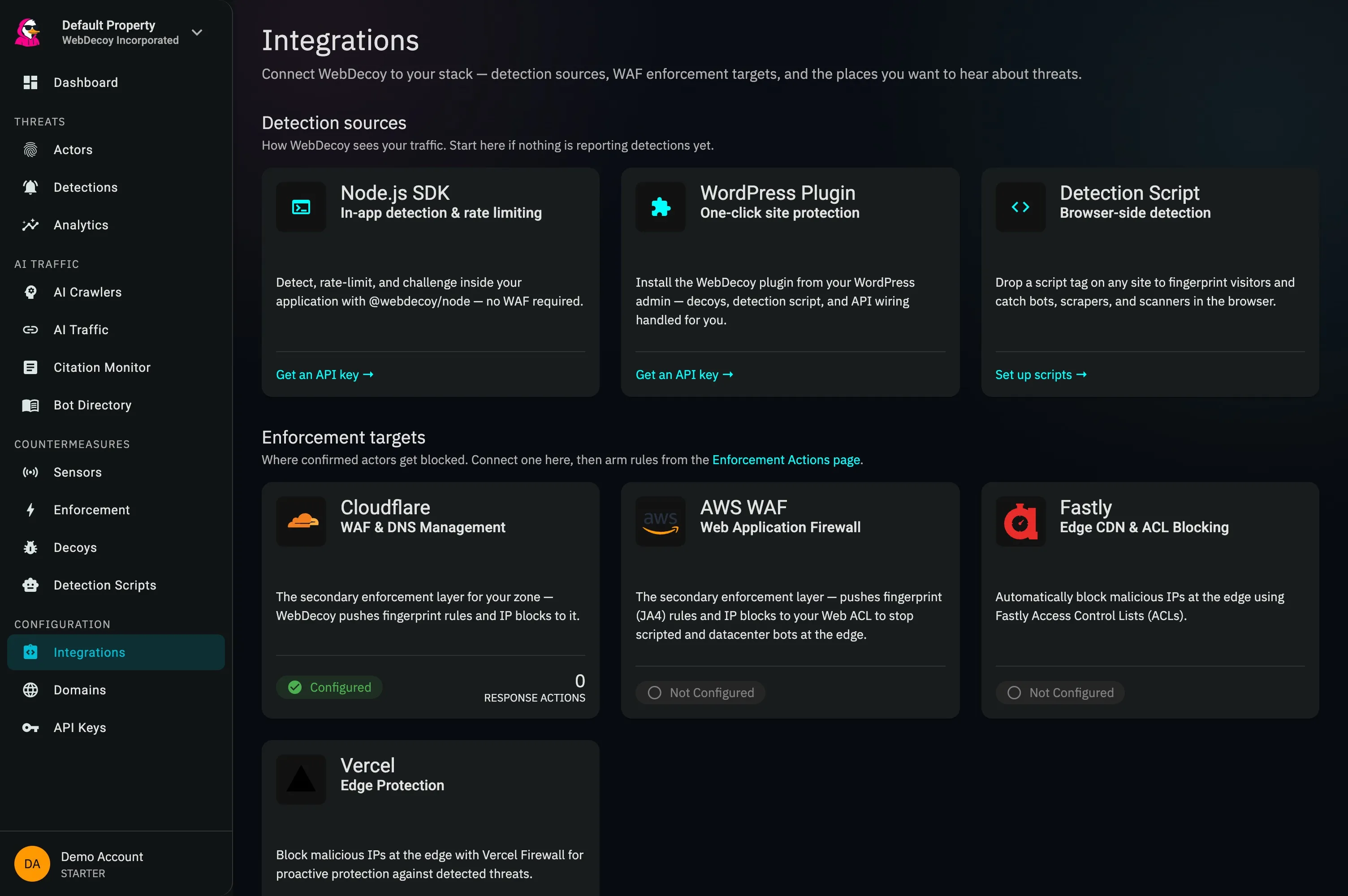
The current Integrations screen. Detection sources come first; enforcement targets follow after traffic is visible.
For the complete integration catalog and product positioning, see the WebDecoy integrations overview.
Enforcement itself (the Monitor/Enforce mode, clearance token, edge validator, allowlist, and response actions) is configured on the separate Enforcement page; the WAF cards here are the connection step of that pipeline.
Which plan includes which integrations is listed in Plans and billing.
Detection sources are included on every plan, Free too. Adding an integration that notifies or acts (Slack, webhooks, CrowdStrike, Datadog, Splunk, AWS WAF, Vercel Firewall, or a Fastly integration that blocks) requires a paid plan or an active trial; on Free the API answers 402 upgrade_required. Integrations you already have stay listed and can be edited, paused, tested and deleted on any plan, but switching a paused one back on counts as adding it. Fastly log streaming is detection: on Free, create the Fastly integration with the Log Only action and set up log streaming on it.
The Four Categories
Section titled “The Four Categories”1. Detection sources
Section titled “1. Detection sources”How WebDecoy sees your traffic. Start here if nothing is reporting detections yet.
| Source | Capability |
|---|---|
| Node.js SDK | In-app detection, rate limiting, and tripwires, with no WAF required |
| WordPress Plugin | Zero-config site protection from your WordPress admin |
| Detection Script | Browser-side fingerprinting and bot detection on any site |
2. Enforcement targets
Section titled “2. Enforcement targets”Where confirmed actors get blocked. Connect one here, then arm rules from the Enforcement page. Automatic, score-driven blocking is currently withheld until scores are calibrated; manual blocks work today. See What runs automatically today.
| Integration | Capability |
|---|---|
| AWS WAF | Actor fingerprint (JA4) rules + managed IP blocks in your Web ACL |
| Cloudflare | Cloudflare WAF connection. IP blocks and session clearance work on any plan; fingerprint (JA4) rules need Bot Management |
| Fastly | Detection from log streaming, plus IP blocking via Fastly ACLs |
| Vercel | IP block or challenge rules in a project’s Vercel Firewall |
3. Notifications
Section titled “3. Notifications”| Integration | Capability |
|---|---|
| Slack | Real-time alerts in your channels |
| Webhooks | Signed events POSTed to any URL |
4. SIEM & analytics
Section titled “4. SIEM & analytics”| Integration | Capability |
|---|---|
| CrowdStrike | Event forwarding to Falcon LogScale |
| Datadog | Log streaming to Datadog Logs |
| Splunk | Event forwarding via HTTP Event Collector |
How enforcement flows
Section titled “How enforcement flows”Detection → Actor correlation │ ▼Response Action triggers (Enforcement page) │ ├── block_actor → JA4 rule at AWS WAF or Cloudflare │ (rotating-actor trigger only) ├── block_ip → time-boxed IP block (AWS WAF, Cloudflare) ├── webhook → POST to your endpoint └── email → alert your team (rotating-actor trigger only)
block_actor and block_ip are withheld until scorer calibration.Fastly and Vercel block through their own integration settings(also withheld), and every provider accepts manual blocks.
Notifications & SIEM streams are configured per integration,separately from Response ActionsRecommended Setup
Section titled “Recommended Setup”Minimum protection
Section titled “Minimum protection”- A detection source: SDK, WordPress plugin, or detection script (plus your decoys)
- Slack: get notified of high-risk detections
Full security stack
Section titled “Full security stack”- AWS WAF or Cloudflare: a WAF connection for actor-level and IP blocking
- Session clearance: rotation-proof lockout for browser-grade traffic
- Slack: real-time team notifications
- CrowdStrike, Datadog, or Splunk: forward detection events to the SIEM you already use
- Webhooks: custom automation
Best Practices
Section titled “Best Practices”- ✅ Test integrations with their Test button before relying on them
- ✅ Start with notifications, review Monitor-mode data, then enforce
- ✅ Use high-risk alerting to reduce noise
- ✅ Keep API credentials secure; use dedicated tokens per integration
Next Steps
Section titled “Next Steps”- AWS WAF: fingerprint rules and a managed IP set
- Response Actions: arm the automations
- Session Clearance: the token gate for browser-shaped traffic
- Slack: quick notification setup